 Godot
GodotGodot Engine
The GDExtension is very experimental, and may not be stable. Please report any issues you find.
We are experimenting with our shared Colyseus Native SDK for cross-platform support for Colyseus across different engines. Godot is the first engine to support this. The work on Native SDK is still in progress, so expect some breaking changes as we go.
Platforms
- Desktop (Windows, macOS, Linux)
- iOS
- Android
- Web (HTML5)
Installation
- Download the latest Godot SDK from GitHub Releases
- Extract the addons folder into your Godot project root
- Enable the plugin in Project Settings → Plugins
Web Builds
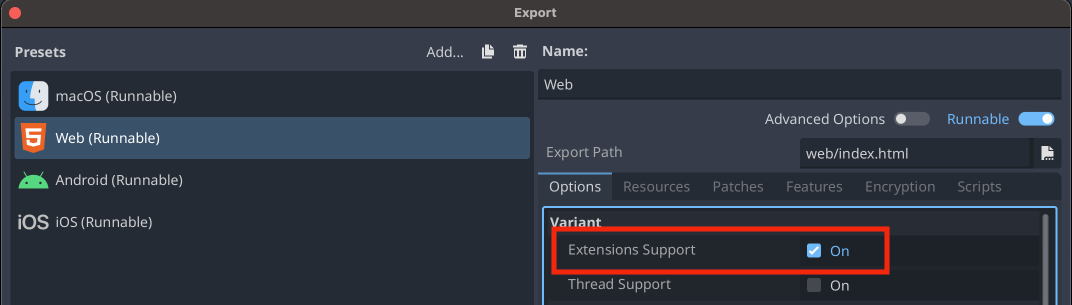
When exporting your project via Project → Export → Web (Runnable), make sure to enable Extensions Support.
SDK API
Navigate to the Client SDK for API Reference, and select the Godot tab.
Quick Example / Reference
This example shows how to connect to a room, listen for state changes, send messages and leave the room.
extends Node

var client: ColyseusClient
var room: ColyseusRoom
var callbacks: ColyseusCallbacks

func _ready():
	# Create and connect client
	client = Colyseus.create_client()
	client.set_endpoint("ws://localhost:2567")

	print("Connecting to: ", client.get_endpoint())

	# Join or create a room
	room = client.join_or_create("test_room")

	# Connect signals
	if room:
		room.joined.connect(_on_room_joined)
		room.state_changed.connect(_on_state_changed)
		room.message_received.connect(_on_message_received)
		room.error.connect(_on_room_error)
		room.left.connect(_on_room_left)

func _process(delta):
	# Poll the client for messages
	# (Only required for web builds)
	ColyseusClient.poll()

func _on_room_joined():
	print("✓ Joined room: ", room.get_id())
	print("  Session ID: ", room.get_session_id())
	print("  Room name: ", room.get_name())

	# Get callbacks container for the room
	callbacks = Colyseus.callbacks(room)

	# Listen to root state property changes
	callbacks.listen("currentTurn", _on_turn_change)

	# Listen to collection additions/removals
	callbacks.on_add("players", _on_player_add)
	callbacks.on_remove("players", _on_player_remove)

	# Send a message
	var message = "Hello from Godot!".to_utf8_buffer()
	room.send_message("add_item", {"name": "MY NEW ITEM"})

func _on_turn_change(current_value, previous_value):
	print("↻ Turn changed: ", previous_value, " -> ", current_value)

func _on_player_add(player: Dictionary, key: String):
	print("+ Player joined: ", key)
	# Listen to nested schema properties
	callbacks.listen(player, "hp", _on_player_hp_change)
	# Listen to nested collections
	callbacks.on_add(player, "items", _on_item_add)

func _on_player_remove(player: Dictionary, key: String):
	print("- Player left: ", key)

func _on_player_hp_change(current_hp, previous_hp):
	print("  HP changed: ", previous_hp, " -> ", current_hp)

func _on_item_add(item: Dictionary, index: int):
	print("  Item added at index: ", index, " -> ", item)

	callbacks.listen(item, "name", func(name, _prev):
		print("  Item name: ", name))

func _on_state_changed():
	print("↻ Room state changed")
	# Access state as Dictionary
	var state = room.get_state()
	if state:
		print("  State: ", state)

func _on_message_received(type: Variant, data: Variant):
	# type is the message type (String or int for numeric types)
	print("✉ Message received - type: ", type, " data: ", data)

func _on_room_error(code: int, message: String):
	printerr("✗ Room error [", code, "]: ", message)

func _on_room_left(code: int, reason: String):
	print("← Left room [", code, "]: ", reason)

func _exit_tree():
	# Clean up when node is removed
	if room and room.has_joined():
		room.leave()
State Schema Codegen
It is not required to use the State Schema Codegen, but it is recommended to use it to get type safety and autocomplete in your IDE.
npx schema-codegen src/rooms/schema/* --gdscript --bundle --output ../colyseus/schema/See the full State Schema Codegen documentation for more options and details.
 Unity
Unity Defold